If you run an airtime recharge card printing business in Nigeria, every airtime voucher you print passes directly through customer hands: sub-dealers, kiosk operators and everyday buyers loading PINs printed on the paper.
Leaving that printed airtime recharge card blank or generic is a missed marketing opportunity. You can turn every printed recharge voucher into a mini flyer that advertises your brand across your neighborhood at zero extra cost if you add your business name to recharge cards printed for sale.
Here is why branding or customizing your recharge cards with your business name matters, along with a quick step-by-step guide to setting it up on the Netdivo ePIN manager portal.
Why You Should Add Your Business Name To Recharge Cards in Nigeria
- Free Local Exposure: Every printed recharge card carries your business name directly into homes, shops and offices.
- Builds Buyer Trust: Customers want confidence that the airtime PIN printed on the paper is valid. A clear business name and location make your airtime recharge cards look professional and traceable.
- Drives Repeat Business: When customers get reliable airtime epins that load smoothly, they know exactly whose shop or brand to look for next time.
- Sets You Apart from Generic Resellers: Most casual operators hand out bare airtime recharge cards. Including your details immediately establishes you as a recognized local vendor.
Step-by-Step: How to Add Your Business Name To Recharge Cards With Netdivo ePin Manager
Setting up your brand details takes less than two minutes. Once saved, your information automatically prints at the top of every airtime voucher batch you generate with NetDivo ePin Manager.
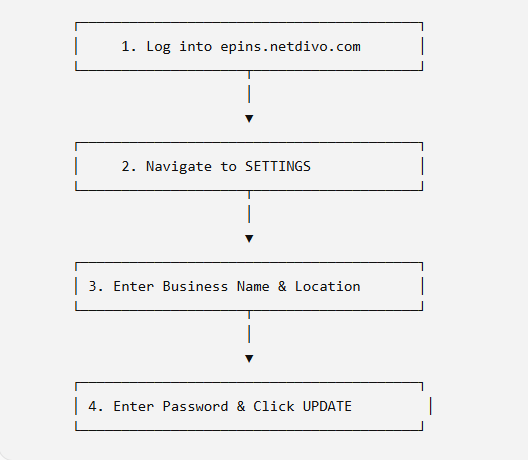
Step 1: Open the Portal
Launch your browser on your phone or computer and visit epins.netdivo.com.
Step 2: Sign In
Click LOGIN in the menu.
- If you already have an account, enter your username and password.
- If you are new, click Create an Account to sign up first.
Step 3: Go to Settings
Once you are logged into your dashboard, click on SETTINGS.
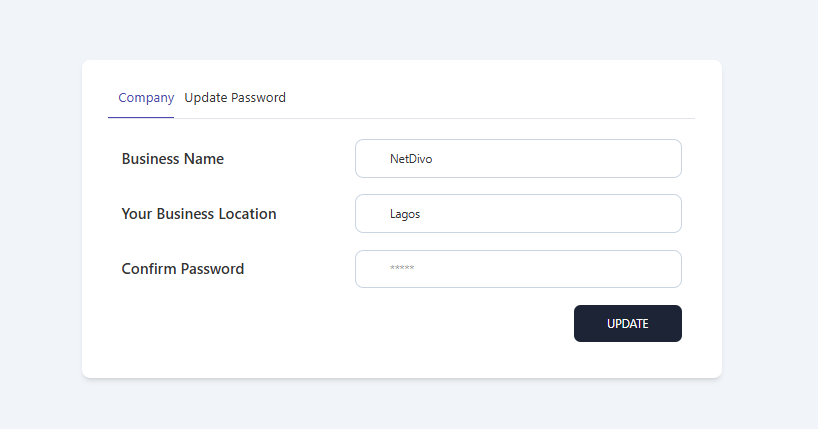
Step 4: Enter Your Business Info
On the settings page, fill in the branding fields:
- Business Name: Enter the exact trading name you want displayed on the printed recharge cards (e.g., NetDivo Telecom).
- Business Location (optional): Add your physical shop location or contact detail (e.g. Ikeja, Lagos).
Step 5: Enter Your Password
Type in your current login password to authenticate the change.
Step 6: Click Update
Click UPDATE to save.
That is all. Whenever you generate and print recharge cards from epins.netdivo.com, your business name and location will appear prominently on every printed voucher.
Practical Tips
- Keep the Location Compact: Space on paper airtime vouchers is limited. Use a short, recognizable location or append a support phone number.
- Double-Check Spelling: Check your business name before updating so every printed sheet looks sharp and error-free.
- Update When You Move: If you relocate or open a new outlet, update your settings immediately so all future print runs reflect your current location.
Frequently Asked Questions (FAQ)
Does adding my business name to my recharge cards cost extra money?
No. Customizing your recharge cards with your business name and location on the Netdivo ePIN manager portal is 100% free for all registered users.
Can I change my business name later?
Yes. You can update your business name or location at any time by returning to the SETTINGS tab and updating your info.
Will my business name show on all network cards?
Yes. Once set in your account profile, your business name will appear across all network recharge cards generated from your account at https://epins.netdivo.com
Ready to Customize Your Recharge Cards With Your Business Name?
Don’t print another plain, generic recharge card. Stand out from the crowd and grow your business today.
👉 Log in to epins.netdivo.com now to set your business name and start printing custom branded recharge cards!
Learn more about Netdivo ePin Manager via 👉 https://www.netdivo.com/epinmanager
Leave a Reply